


KEY TAKEAWAYS
- Understand the causes and solutions for the “Share Focus Status Not Working” issue
- Learn the ideal scenario of a working Share Focus Status
- Discover the importance of resolving this issue for seamless device operations
- Explore detailed steps to resolve the problem and prevent future occurrences
- FAQs related to the problem
- Understanding the Share Focus Status Not Working Issue
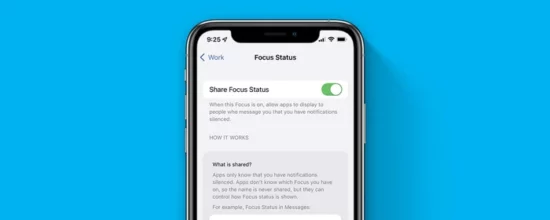
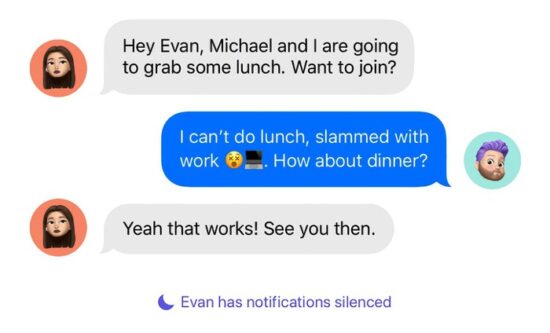
In an ideal scenario, when you enable a Focus mode, the status is shared across your devices and displayed to your contacts. It allows you to manage notifications and alerts more efficiently, letting others know when you're busy or available. It should work seamlessly across all Apple devices when they're updated and synchronized.
The “share focus status not working” error typically occurs when a user tries to share their Focus status across devices. It might not reflect accurately on other devices, leading to misunderstandings about availability and interruptions during work. It is most commonly seen after an iOS update or when there are discrepancies in settings across devices.
Basic Troubleshooting: Have You Tried These Steps?
Before diving into advanced solutions, it's essential to cover basic troubleshooting steps. These include restarting your device, updating your software, ensuring your devices are synced, and checking your settings for any discrepancies.
Resolving this issue is essential for seamless communication and productivity. With the focus status functioning correctly, users can manage their time and notifications effectively, avoiding unnecessary interruptions. It's crucial for maintaining a work-life balance, especially in a world where remote work and digital communication are prevalent.
SOLUTION 1: Update Your iOS
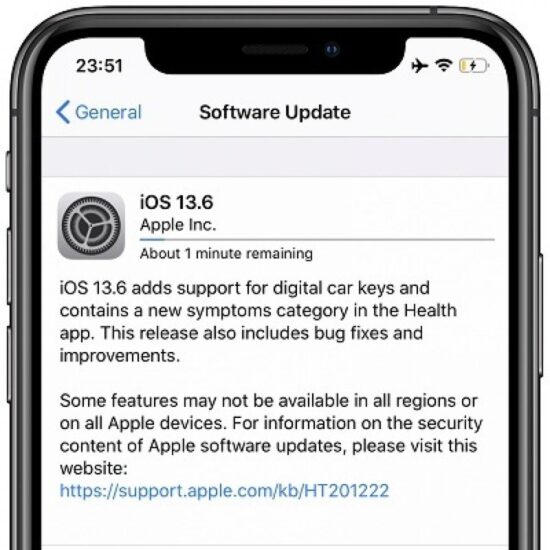
One of the most common reasons for the “share focus status not working” issue is outdated software. By updating your iOS to the latest version, you may resolve this issue.
Go to Settings on your device.
- Scroll down and tap on “General.”
- Tap on “Software Update.”
- If an update is available, tap “Download and Install.”
SOLUTION 2: Check Your Focus Status Settings
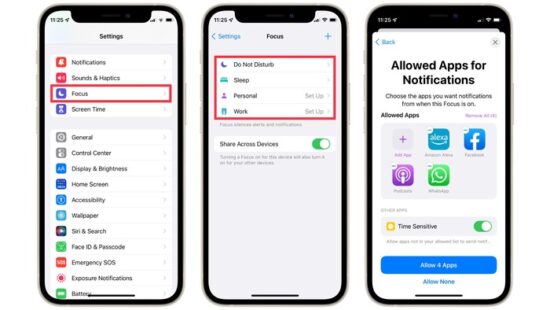
Incorrect settings configuration can also lead to this error. Check and modify your Focus Status settings as follows:
- Open Settings on your device.
- Tap on “Focus.”
- Select the Focus mode you're using.
- Ensure that “Share Across Devices” is toggled on.
- Under “People,” make sure that “Allow Notifications” is enabled for the contacts you want to share your status with.
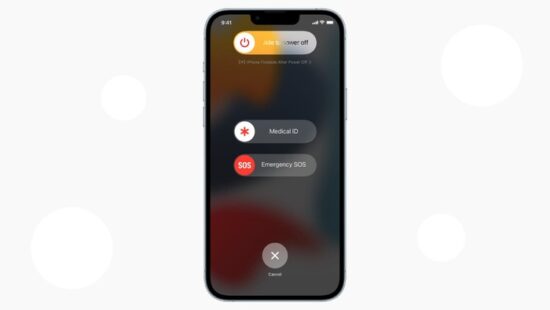
SOLUTION 3: Restart Your Device
Sometimes, a simple device restart can resolve minor software glitches.
- Press and hold the power button and volume down button until the power off slider appears.
- Drag the slider to turn your device off.
- After your device turns off, press and hold the power button again until you see the Apple logo.
SOLUTION 4: Reset All Settings
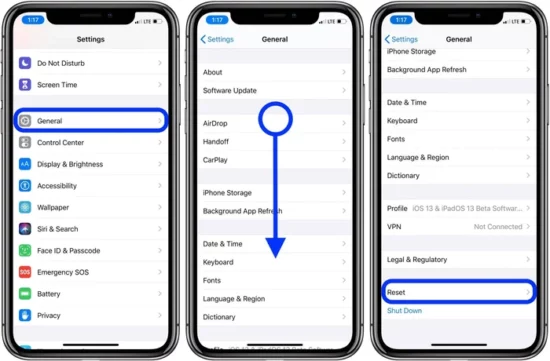
If the issue persists, resetting all settings on your device might help.
- Open Settings.
- Scroll down and tap on “General.”
- Scroll down again and tap on “Reset.”
- Tap “Reset All Settings.”
- Enter your passcode and confirm the action.
SOLUTION 5: Reach Out to Apple Support
If all else fails, consider reaching out to Apple Support. They have professionals who can provide further assistance.
To prevent such issues in the future, ensure your iOS device is always updated with the latest software. Regularly check your Focus Status settings and maintain synchronization between your devices.
Conclusion
The “share focus status not working” issue can be disruptive but is solvable with the right approach. This article provides a comprehensive guide to understanding the issue and implementing practical solutions. Should all else fail, don't hesitate to reach out to Apple Support for further assistance.
FAQs
It could be due to outdated software, glitches within the iOS system, or incorrect settings configuration.
You can try updating your iOS, checking your Focus Status settings, restarting your device, or resetting all settings.
It allows you to share your focus mode status with your contacts across devices, helping manage notifications and alerts more efficiently.
How do I update my iOS?
You can update your iOS through the “Software Update” option under “General” in your device's Settings.
What should I do if none of the solutions work?
If all else fails, reach out to Apple Support for further assistance.
